Variables
Abstraction over values.
Four kinds of variables
- Block inputs (a.k.a. parameters)
- Loop variables (in
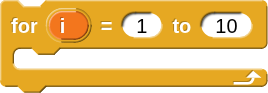 )
) - Global variables
- Script variables
Setting a variable
For all the kinds of variables we can set them with the  block.
However, block inputs and loop variables are typically not set by code: inputs are provided when the block is called and the loop variable is managed by the loop.
Also, note: the name of the variable is in a dropdown. The dropdown is not a hole; you don’t drag in the name of the variable you want to set.
Script variables
Script variables are defined with the  block.
This block creates a new variable that you can use from that point forward in the script.
After it is created, set it with  .
.
Global variables
Global variables are created with the “Make a variable” button at the top of the Variables palette.

Why “global”?
Global variables are called that because they can be used anywhere.
They are also set with .
Because they are global they can be used to share information between sprites.
Showing and hiding global variables
By default global variables are also displayed on the stage but you can hide them by unticking the checkbox next to their name in the palette.

Putting it all together
Set the global variable:

