Snap! Cheat Sheet
This guide will show you how to match up the procedures in the AP exam language with the blocks in Snap!.
Assignment, Display, and Input
There are significant differences between the language used on the AP exam and Snap! in this section.
| On the AP Exam | In Snap! | Notes |
|---|---|---|
a ← expression |
 |
In Snap!, you must first create a variable before you use assign it a value. You can use the |
DISPLAY (expression) |
 Variations on say:   Another way to display:  |
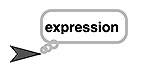
There are several ways to display data to the user in Snap!. One way is in the form of speech balloons that are "spoken" by the sprites on the stage. Here is the behavior that results from running the instruction In Snap!, there are also variations on this block such as:
The |
INPUT () |
  |
In Snap!, user input is always prompted by running an |
 button in the Variables palette to create a global variable or
 .png) to create a local (script) variable.
to create a local (script) variable.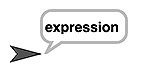
Arithmetic Operators and Numeric Procedures
There are no major differences between the language used on the AP exam and Snap! in this section.
| On the AP Exam | In Snap! | Notes |
|---|---|---|
a + ba – ba * ba / b |
    |
These blocks are straightforward. You can put any numeric expressions in the input slots, including numbers or variables. For example: |
a MOD b |
 |
Same as above: You can use any numeric expressions as input. For example: |
RANDOM (a, b) |
 |
Same as above: You can use any numeric expressions as input. |
 or
or 

Relational and Boolean Operators
There is one difference between the language used on the AP exam and Snap! in this section: you will need to create some procedures yourself.
| On the AP Exam | In Snap! | Notes |
|---|---|---|
a = ba ≠ ba > ba < ba ≥ ba ≤ b |
 There is no ≠ block.  There is no ≥ block.There is no ≤ block. |
The hexagonal block shape indicates that this is a predicate block; it only reports (returns) There are no |
NOT condition |
 |
Hexagonal input slots indicate that a predicate ( |
condition1 AND condition2 |
 |
Same as above: Hexagonal input slots require predicate inputs. |
condition1 OR condition2 |
 |
Same as above: Hexagonal input slots require predicate inputs. |
 ,
,  , and
, and  .
.Selection
There are no major differences between the language used on the AP exam and Snap! in this section.
| On the AP Exam | In Snap! | Notes |
|---|---|---|
IF (condition)
{
<block of statements>
}
|
 |
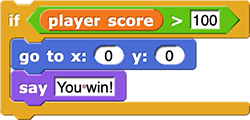
Here is an example of how the |
IF (condition)
{
<first block of statements>
}
ELSE
{
<second block of statements>
}
|
 |
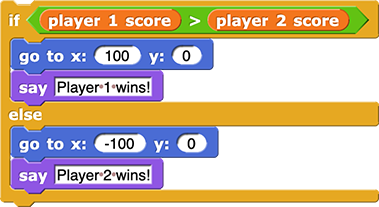
Here is an example of how the |
Iteration
There are no major differences between the language used on the AP exam and Snap! in this section.
| On the AP Exam | In Snap! | Notes |
|---|---|---|
REPEAT n TIMES
{
<block of statements>
}
|
 |
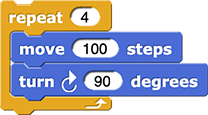
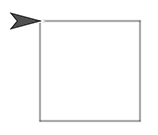
Here is an example of how the |
REPEAT UNTIL (condition)
{
<block of statements>
}
|
 |
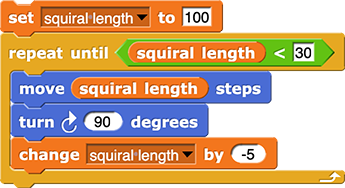
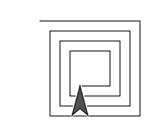
Here is an example of how the |
List Operations
There are only small differences in wording and structure between the language used on the AP exam and Snap! in this section.
| On the AP Exam | In Snap! | Notes |
|---|---|---|
list[i] |
 For example, ![list (hello) (goodbye) reporting the list [hello, goodbye]](/bjc/external/cheat-sheet/hello-goodbye.png)  |
You can tell what kind of input is expected in each input slot of a block in Snap! by its shape. For example, |
list[i] ← list[j] |
 |
At first glance, this looks a little different on the exam than in Snap!, but if you read the Snap! out loud, it is clear what it does: It replaces the item at position number i in the list with the item at position number j in the list. Here’s an example: |
list ← [value1, value2, value3] |
 |
In Snap!, it’s recommended not to name any variable list because there is a block called |
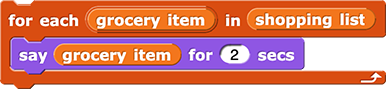
FOR EACH item IN list
{
<block of statements>
}
|
 |
You can change the name of the first variable by clicking it. Here is an example of how the |
INSERT (list, i, value) |
 |
The |
APPEND (list, value) |
 |
The Snap! |
REMOVE (list, i) |
 |
The Snap! |
LENGTH (list) |
 |
Note that Snap! has two
|
 takes a number as its first input (indicated by the round input slot) and a list as its second input (indicated by the small picture of a list):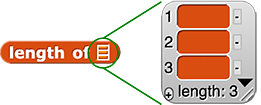



 and
and
Procedures
| On the AP Exam | In Snap! | Notes |
|---|---|---|
PROCEDURE name (parameter1, parameter2, ...)
{
<instructions>
}
|
Empty command block definition  |
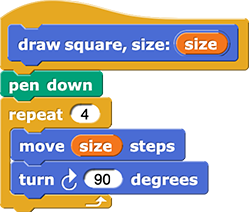
In Snap!, procedures that do something are called commands. Command blocks have a rectangular, puzzle-piece shape because they are instructions to the computer designed to be snapped together one after another. When you make a block, you choose the name of the block, the input parameters, and the palette it should appear in (the color). Then you design the instructions that will run when the block is clicked. Here is an example of what a real command block definition might look like in Snap!: You can learn more about making block and adding inputs on the Snap. ! Cheat Sheet |
PROCEDURE name (parameter1, parameter2, ...)
{
<instructions>
RETURN expression
}
|
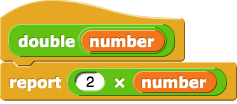
Empty reporter block definition 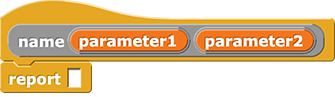 |
In Snap!, procedures that report (return) a value are called reporters. Reporter blocks have a rounded shape and they can either be clicked to report a value to the programmer or they can be dropped into an empty input slot of another block to be used as input. When you make a reporter block, the block definition automatically includes a Here is an example of what a real reporter block definition might look like in Snap!: |
Robot
These blocks do not exist in Snap!, but Snap! has something similar: sprite motion. The big difference is that the robot blocks in the AP language work on a grid, so the robot can move only vertically or horizontally. In Snap!, sprites move much more flexibility, but you can use Snap! blocks to simulate robot motion.
| On the AP Exam | Notes on Recreating in Snap! |
|---|---|
MOVE_FORWARD () |
In Snap!, you can use the On the exam, you can’t give You can use the |
ROTATE_LEFT ()ROTATE_RIGHT () |
In Snap!, you can use the On the exam, you can’t give You can use the |
CAN_MOVE (direction) |
In Snap!, there are several ways to detect what is around the sprite, but since there is no robot, there is nothing quite like In Snap!, you can use these blocks to help your sprites determine how to move: |
 block to move the sprite forward any number of steps.
 and
and  blocks to turn the sprite any number of degrees.
 ,
,  , and
, and 