Page 1: What’s a Predicate?
Unit 2, Lab 3, Page 1
On this page, you will review predicates and build a few that you can use in other projects.
As you know, predicates are reporter blocks (functions) that always report a Boolean value (they report only the values  or
or  ). In Snap!, predicates are represented by hexagonal blocks. Boolean values are used in the condition hole of control blocks like
 if, if else, or repeat until to decide when to do something. (Those holes are also hexagonal to remind us what goes there.)
Thinking about the types of values and where which types of values can be used is another important kind of abstraction.
Knowing that the condition hole in an if or repeat until block has to be a Boolean value helps us think about how to put together our code without thinking about specific blocks—we know any predicate block could be used but that it wouldn’t make sense to use a block that reports a different type of value like a number or text. If you get in the habit of thinking about types, you’ll have many fewer bugs in your programs, because you’ll automatically double-check that the output type of a reporter matches the input type of the block in which you’re trying to use it.
Input and Output (Domain and Range)
In computer science we talk about the input types and output type of a function (a.k.a. a block in Snap!).
The input types of a function are the types of values each of its inputs can take. For instance a block like
 expects two numeric values.
The output type of a function is the type of value it will report. The
also reports a numeic value. But some blocks report a different type of value than their inputs.You may have learned in math class that mathematicians call a function’s input type its domain and its output type its range.
When using values reported by one block as the input to another block you want to make sure the output type of the one matches the input type of the other so you’re not trying to put a round peg in a square hole. Note, however, that some blocks have holes that accept any type of value. For example the holes in a  block can be filled with any kind of value.
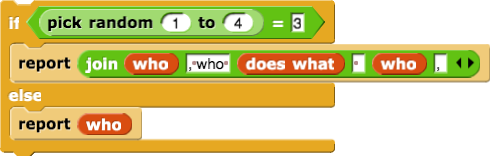
Predicates ask a true/false question such as “Is the random number 3?” or “Is this sprite touching the sprite called ‘Leader’?”
Every if else block has two scripts inside of it, exactly one of which will be run depending on the value that the predicate reports. Then the computer continues with whatever comes after the if else block.
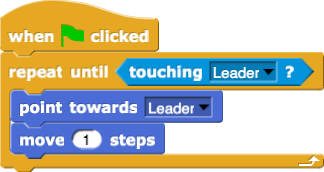
In Unit 1 Lab 5, you made a script to get the sprite to follow the mouse.

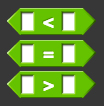
Now use one or more of the following relational operators to create a script that lets you use your mouse to write on the stage in two colors depending on the mouse’s position on the stage.
Click for an example of writing on the stage in two colors.
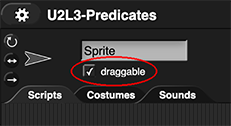 Make the sprite draw only if the mouse button is down, so that you can draw disconnected shapes. You’ll need to uncheck the “draggable” box above the scripting area (shown right) before you try this (so that Snap! doesn’t think you are trying to drag the sprite when you click).
You’ll probably want to use the
 block, which you can find in the Sensing palette.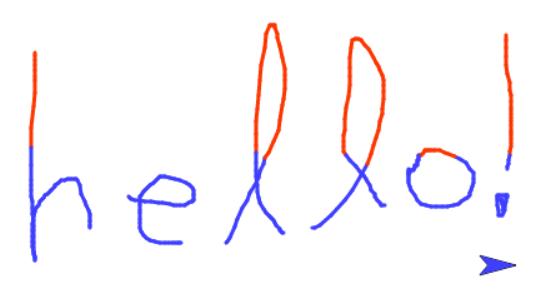
Sequencing, Selection, Iteration
Selection means deciding (selecting) which part of an algorithm to run based on whether a condition is true or false.
Every algorithm can be constructed using sequencing (following steps in order), selection (deciding), and iteration (repeating).
You may see these five relational operators: =, >, <, ≥, ≤ as well as a sixth: ≠, which means “not-equal” and reports false if the two inputs are equal and otherwise reports true (if they are not equal). When you write the  block, it will work like this:


These six relational operators all report a Boolean value (true or false).