Modeling Language: Plurals, Part 1
Siri and other robots are programmed to generate language. Siri speaks; some robots write. You have developed a program, gossip, that writes. In this project, you will extend the computer’s abilities with language by developing a reporter block, plural, that takes a noun as input and correctly spells and outputs the plural


Spelling a plural can seem almost automatic for a person, but it is not simple: a computer needs an algorithm to do that task.
This project uses blocks already loaded for you from Snap!’s “Words, sentences” library. You can load a library from the Snap! File menu  under “Libraries…”.
To do this project, you will need to use the new blocks
 , and
, and  . You will also need
 -contains-(some-item)-predicate.png) and
and  , which you used in Unit 1 Lab 2, Gossip and Greet.
Assignment
Try all its expressions (the nine one-line scripts) and experiment with their inputs until you are sure you understand what they do. For each expression, say what that script does in general not just what it does with this particular input. (Example: reports “y”, but you want to say what
 last letter ofwill report if, say, “2017” is its input.)
You won’t need  for the project, but you might find it interesting to try it not only with “when,” as an input but with “where,” “what,” “wherefore.” Linguists use evidence like this to understand the history of a language.
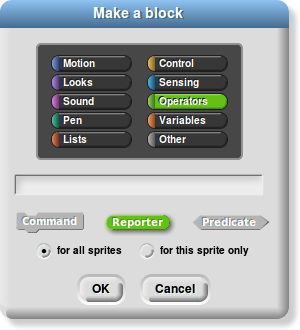
Choose the reporter button when you make plural.
Here’s one way to start building the
pluralblock. Build this much and test it out on at least “day” and “boss” and “medicine,” to make sure it works correctly for those. If it does not, edit and fix it.
.png)
Debugging: Try to find words for which this version of
pluraldoes not work correctly. List the words you find. Organize that list, sorting the words into categories according to their last letter. For example, it will get wrong some words that end with the letter “h”. Try to find many words it gets wrong.
Save your list.
Create a Snap! list like this
 containing all of your test words (successful or otherwise).
“U2-Plural”
 Save your file. You will need this list.
Your
pluralblock should now work correctly for “day” and “boss” and “moth,” but it probably doesn’t yet work correctly for the word “box”:
-result.png)
Edit yourpluralblock to make it work for words that end with “x”. Test it to make sure it does work properly.
You can do the same for conjugating verbs in Spanish or some other language you choose. See the Take It Further section at the bottom.
The next two steps are worth learning—very useful for testing plural and in more advanced work later on—but not essential for building plural.
Use
mapto test all the words on your list. Leave the slot inpluralempty, as you see here. Themapblock inserts each element of the list into that slot and reports a list of the results.

For now, don’t worry about the words it still gets wrong, as long as it works for “day,” “boss,” “moth,” and “box.”
In your
mapscript, replacepluralwith-y.png) . Try it. Now explain what the
. Try it. Now explain what the mapblock does, in general.
Experiment with
-equals-h)-from-test-list.png)
and
-equals-y)-from-test-list.png)
to see what they do. Again, leave the slot inlast letter ofempty, as you see here. That is the placeholder forkeepto test each word the list. Explain what thekeepblock does.
Take It Further…
If you know another language, build a block that takes a pronoun and verb as input and outputs the correct form of that verb. For example:
-for-nosotros-comer.png)
-for-yo-tocar.png)