Music Project
In this project, you will use the Snap! play note block to create music while you review abstract data types and higher-order functions.

Reviewing Higher-Order Functions with Sound
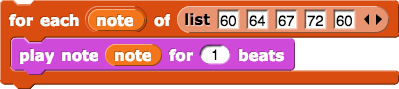
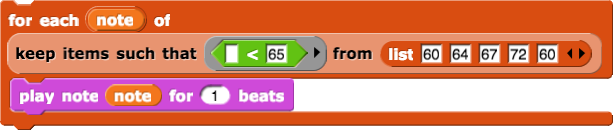
Build and compare these
playscripts. Run each script a few times.The inputs values given to the
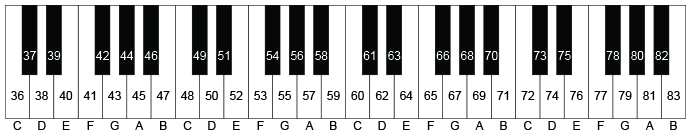
play noteblock are musical pitches. Higher values create higher notes. You can input any integer from 0 and 127. The number 60 represents middle C.

Need to Review?
You learned about
for eachin Unit 2 Lab 2: Checking Each Quiz Answer.You learned about
keepin Unit 2 Lab 3.You learned about
mapin Unit 3 Lab 2.
Creating an Abstract Data Type to Organize Musical Data
Pitch is the amount of highness or lowness of a musical note; the pitch value goes in the first input slot of the
play noteblock.The length of a note is the amount of time that the note plays (the number of beats); the length value goes in the second slot of
play note.Create a
noteADT to manage the pitch and length of each note in a song.Create the constructor:

Create two selectors:


Creating Blocks to Play Music
Use
for eachtogether with your selectors to build a block that takes a list of notes as input and plays each pitch for the specified number length of time.

Chart for note pitch numbers.
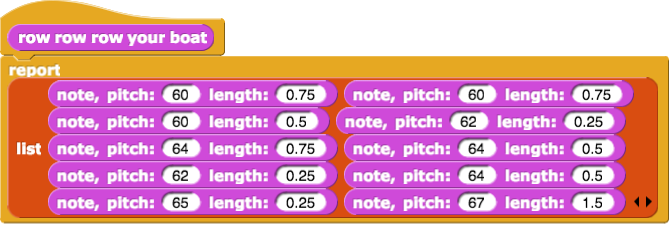
Create a reporter to reports the notes for a song of your choosing. Here’s an example:
Test your song with your
play songblock, and debug any problems.

If There Is Time…
BPM stands for “beats per minute.”
Use the
 block to change the pace at which the notes are played. A higher number will make your song play faster; a lower number will make it play slower.
Transposing Music
 Compare the output of these two scripts that you created above. Discuss what
 map + 5does to the sounds you hear:
Use
maptogether with your ADT blocks to create a reporter that transposes (shifts) a list of notes. It should take a list of notes and a number indicating how much to transpose (shift) the song as input, and it should report the adjusted song. For example:

Reveal a hint.
![transpose block definition hint showing 'transpose (notes) by (shift): report (map (note, pitch: ((pitch from note ([empty list input slot])) + ([something unreadable])) length: ([something unreadable])) over ([something unreadable]))'](/bjc/external/unit-3/transpose-definition.png)
Try playing your song using your
transposeblock with several different shift numbers so that you can hear the impact ofmap.