Page 1: Counting Trees
Unit 8, Lab 1, Page 1
In this lab, you will develop recursive reporters.
On this page, you will explore a procedure for counting the segments in a fractal tree, and re-build it recursively.
In Unit 7, you built recursive trees. Each tree is made up of line segments.
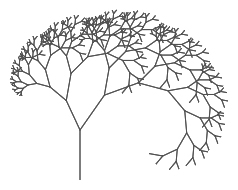
Open your tree project. How many line segments are in a tree of each level? Complete this table. (You can count by eye or have Snap! count for you.)
level segment count 1 1 2 3 3 4 5 6
 How does the number of segments in one level compare to the number of segments in the previous level?
Build a block whose input is a tree number and whose output is the number of segments in that level:

Alphie and Betsy discuss the code they created.
Alphie: I noticed a pattern in the table. Each number of segments is one less than a power of 2.
Betsy: What does your code look like?
Alphie: I used a for loop to build the power of 2, then I subtracted 1 at the end:
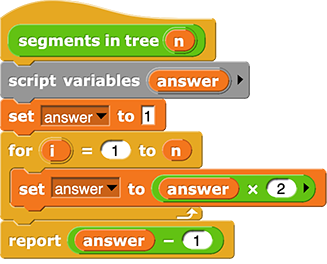
Alphie: At the end, the report block sends the final value. I put the last math operation there.
Betsy: Wow. Mine looks a lot different! I made the code look like the code for tree.
Alphie: Interesting… but I don’t get it.
Betsy: Look back at the code for tree. We used recursion. We built a segment, turned, called tree to build a smaller tree, turned again, and then called tree again to build another, smaller tree.
Alphie: Cool! We can think about how that algorithm works to write the segments in tree reporter recursively. But we can ignore all the moving and turning parts, right? Let me give this a shot.
Betsy: Right! And don’t forget: base cases are important!
You’ve built and worked with recursive command blocks. Recursion can also be used in reporters.
If you haven’t yet, build a recursive reporter that reports the number of segments in a tree of level n.
Remember that you need to click “Apply” before you can use your block recursively in the Block Editor.
Here’s Betsy’s code for the segments in tree function:
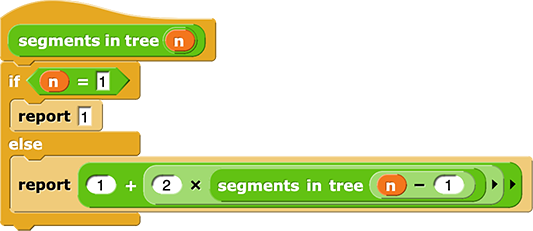
The report block only connects to the blocks above it. That’s because report returns the result of its input slot, immediately, as the output of the segments in tree reporter block. No further code is executed in a reporter after a report block.
 What is the base case condition? What does the program do in that case? Why is the base case necessary?
The
treecommand had two recursive calls, but this code has only one. Why?
Re-read the code for the triangle fractal, and use it to help you build this recursive reporter.
In Unit 7, you built a
triangle fractalblock. Build a block that reports the total number of triangles formed in a level n triangle fractal:

“U8L1-Recursive-Reporters”
